

Settings at a glance
What each part of Settings shows and does.
Tap the gear at the top right of the start screen.
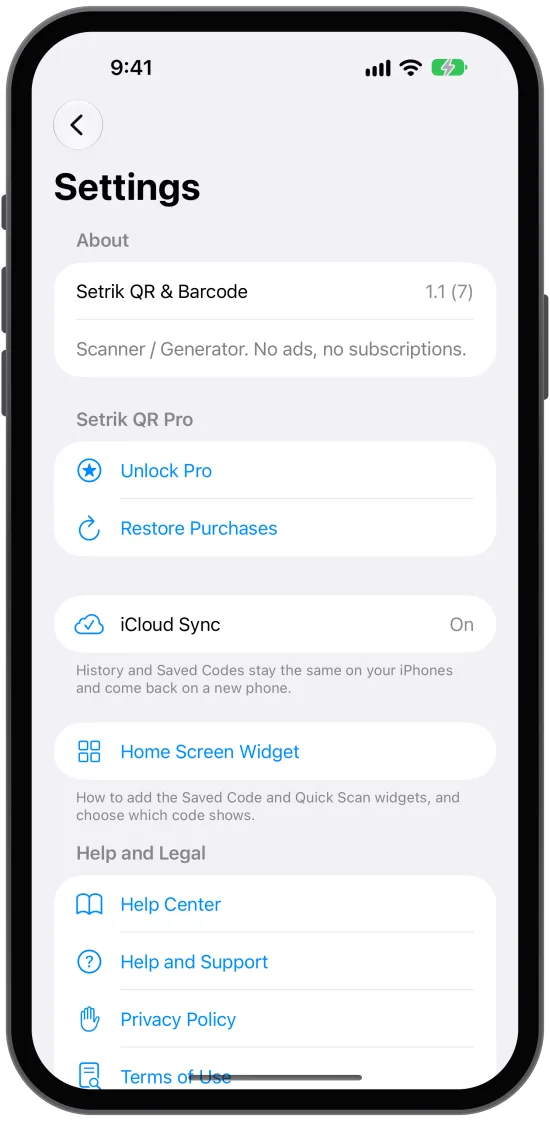
| Section | What it’s for |
|---|---|
| About | Setrik QR & Barcode and the version, like “1.0 (6)”, or “1.1 (7)”. Support may ask for it. |
| Setrik QR Pro | Unlock Pro, or “Pro is unlocked”; Restore Purchases (more). |
| iCloud Sync | Whether your codes sync: On, Not signed in to iCloud, Restricted or Not available (more). |
| Home Screen Widget | How to add the Saved Code and Quick Scan widgets, and choose which code shows (more). |
| Help and Legal | Help Center, Help and Support, Privacy Policy and Terms of Use on the website (more). |
| Send Error Log | Sends us the app’s error log if something goes wrong (more). |
Tips
There are no other settings to manage: no account, no notifications, no
ads. Camera and Photos permissions are in the iPhone’s own Settings app
(more).
Related articles
Still stuck? Email contact@setriksoftware.com with your app version (Settings › About) and what you saw. If something went wrong in the app, sending the error log helps too. You can also browse the Help Center or the messages the app can show.