

Keep your codes on all your iPhones
How iCloud sync keeps your History and Saved Codes the same everywhere, and how to check it's on.
There’s nothing to set up. Setrik QR uses the iCloud account already on
your iPhone. Your History and Saved Codes (with their names, colors and
logos) go to your own private iCloud, which only you can see.
Check that it’s on
- On the start screen, tap the gear (Settings).
- Look at iCloud Sync.
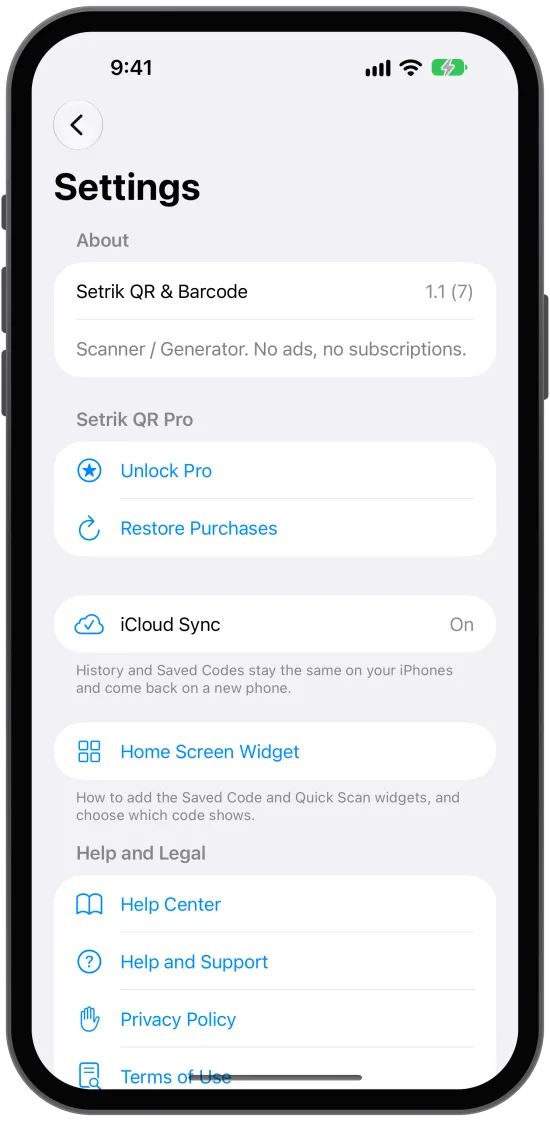
| Status | What it means |
|---|---|
| On | “History and Saved Codes stay the same on your iPhones and come back on a new phone.” |
| Not signed in to iCloud | “Sign in to iCloud in the Settings app to keep your codes on a new phone.” |
| Restricted or Not available | “Your codes are kept on this iPhone only.” |
Tips
- Changes show on your other iPhones after a short while; it needs an
internet connection. - Without iCloud, everything still works; your codes just stay on that
one iPhone. - Setrik Software can’t see your codes. There’s no account.
Related articles
Still stuck? Email contact@setriksoftware.com with your app version (Settings › About) and what you saw. If something went wrong in the app, sending the error log helps too. You can also browse the Help Center or the messages the app can show.