

Rename a saved code
Change the name a saved code shows in your list.
The name is only for you: renaming doesn’t change what’s inside the code,
so printed copies keep working.
Steps
- Tap Saved Codes.
- Touch and hold the code.
- Tap Rename.
- In Rename, type the new name in Name and tap Save.
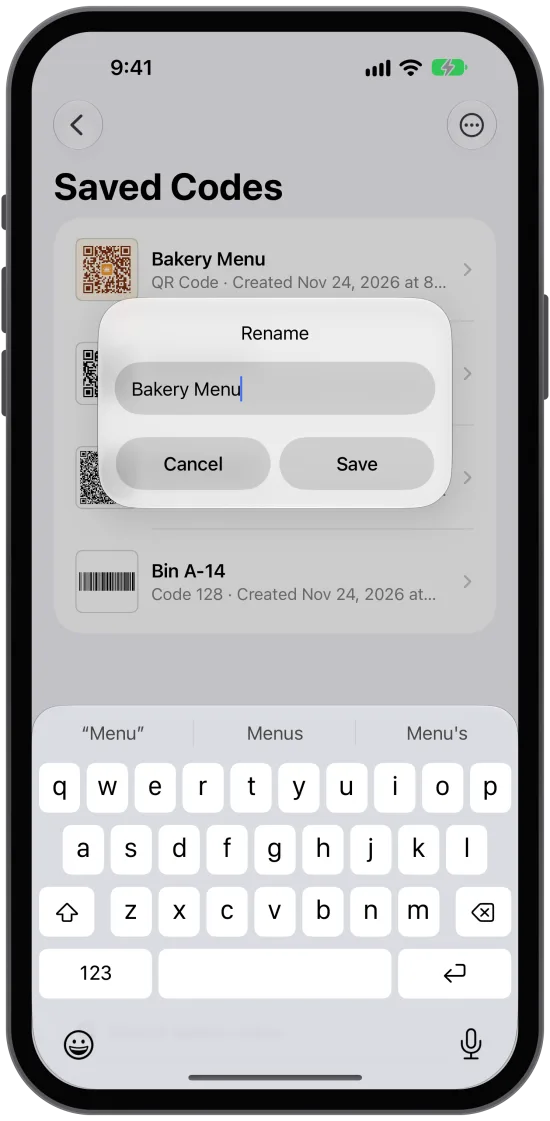
What you’ll see
The new name in the list and at the top of the code’s screen. It’s also
used in file names when you share or export the code. Leave the name
empty and the list shows what’s inside the code instead.
Only saved codes can be renamed. To name a code in History, save it
with the star (how).
Related articles
Still stuck? Email contact@setriksoftware.com with your app version (Settings › About) and what you saw. If something went wrong in the app, sending the error log helps too. You can also browse the Help Center or the messages the app can show.