

Clear History
Remove every code from History in one go, keeping your Saved Codes.
Steps
- Tap History.
- Tap Clear at the top right.
- Read “Clear History?” (“Removes every code from History. Your Saved
Codes stay.”) and tap Clear History.
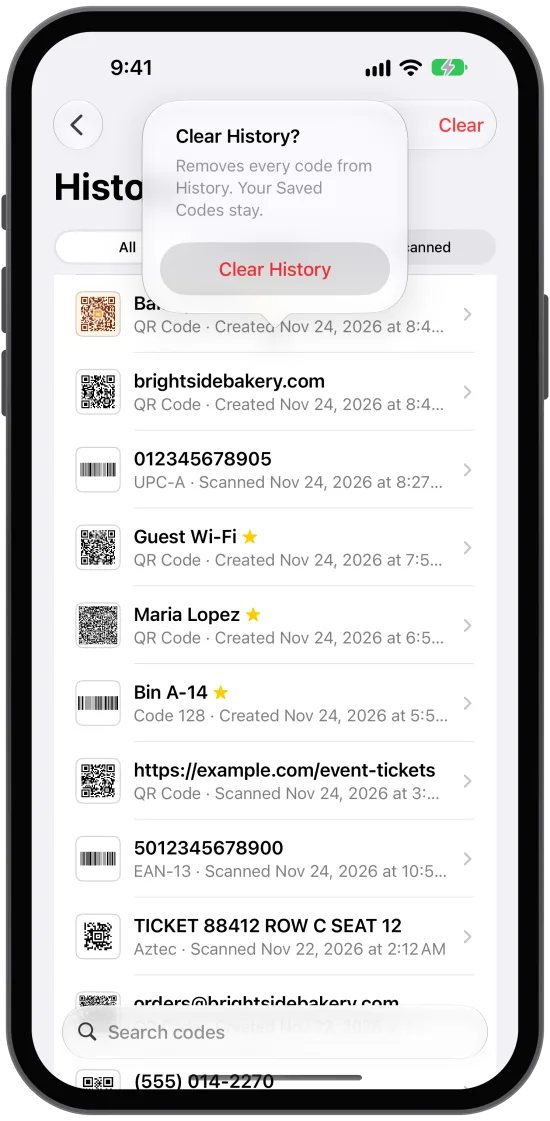
What you’ll see
History shows only your saved codes, or “No History Yet” if you have
none. Saved Codes are untouched. This can’t be undone.
Tips
Clear only shows when History has codes that aren’t saved.
Related articles
Still stuck? Email contact@setriksoftware.com with your app version (Settings › About) and what you saw. If something went wrong in the app, sending the error log helps too. You can also browse the Help Center or the messages the app can show.