

Add a caption under a code
Put a line of text like "Scan for our menu" under a code, in every image and printout.
People scan more when they know what they’ll get.
Steps
- Open the code and scroll to Caption and Frame.
- Type a caption in the box (up to 40 characters) and tap Done on the
keyboard. Or, while the box is empty, tap a quick pick: Scan Me,
Scan for our menu, Scan to visit our website, Scan to join our Wi-Fi, Scan to save my contact.
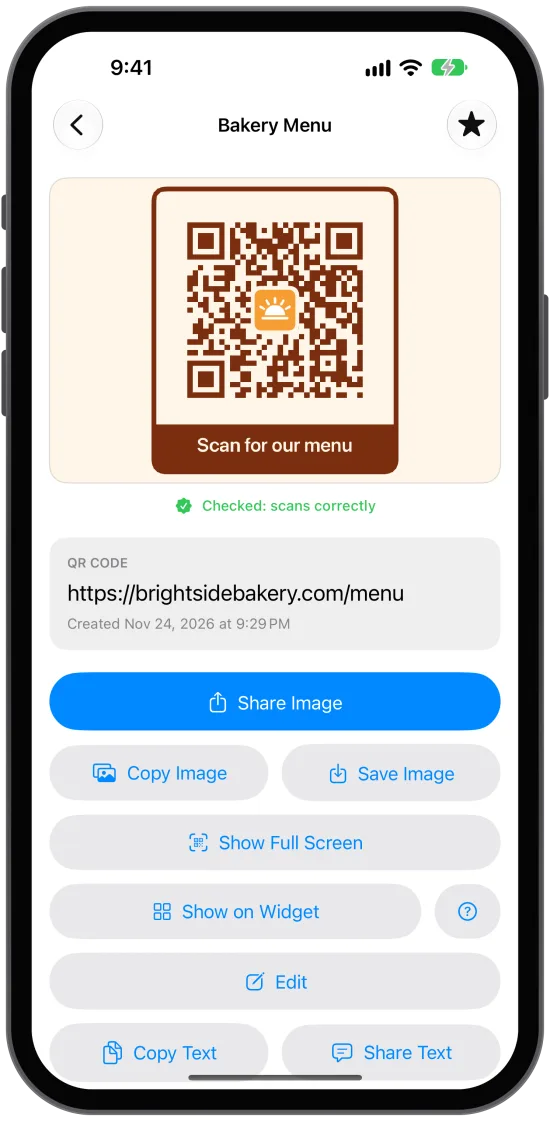
What you’ll see
The caption under the code, shrunk to fit on one line, and the scan
check runs again. “Shown on the shared image, PDF, SVG and printouts. The
scan check above tests it.”
Tips
- To remove it, clear the box.
- Works on QR codes and barcodes. The card shows on every code the app
can draw. - Show Full Screen, the list pictures and the widget show the code
without its caption.
Related articles
- Add a Scan Me frame (Pro)
Still stuck? Email contact@setriksoftware.com with your app version (Settings › About) and what you saw. If something went wrong in the app, sending the error log helps too. You can also browse the Help Center or the messages the app can show.