

Get your codes on a new iPhone
Bring your History, Saved Codes and Pro to a new iPhone or after reinstalling.
Steps
- On the new iPhone, sign in with the same Apple ID you used before,
with iCloud on. - Install Setrik QR from the App Store and open it.
- Wait a moment, with an internet connection. Your History and Saved
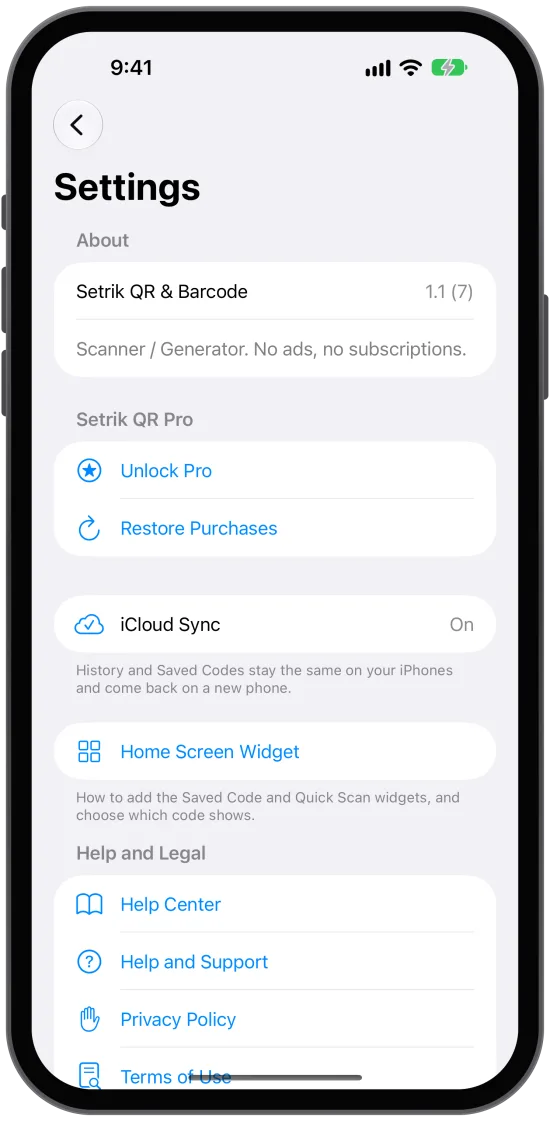
Codes come back by themselves. - If Pro isn’t unlocked, tap the gear (Settings), then Restore Purchases (more).
What you’ll see
Your codes, with their names, colors and logos. (In testing, after
deleting and reinstalling the app, everything came back within seconds.)
If your codes don’t come back
Check Settings › iCloud Sync in Setrik QR says On
(more). Codes made while iCloud was off stay
on the phone they were made on.
Related articles
Still stuck? Email contact@setriksoftware.com with your app version (Settings › About) and what you saw. If something went wrong in the app, sending the error log helps too. You can also browse the Help Center or the messages the app can show.