

Delete a code from History
Remove one code from History for good.
Steps
- Tap History.
- Swipe the code to the left and tap Delete (or touch and hold it
and tap Delete).
A code that isn’t saved is deleted straight away, with no question.
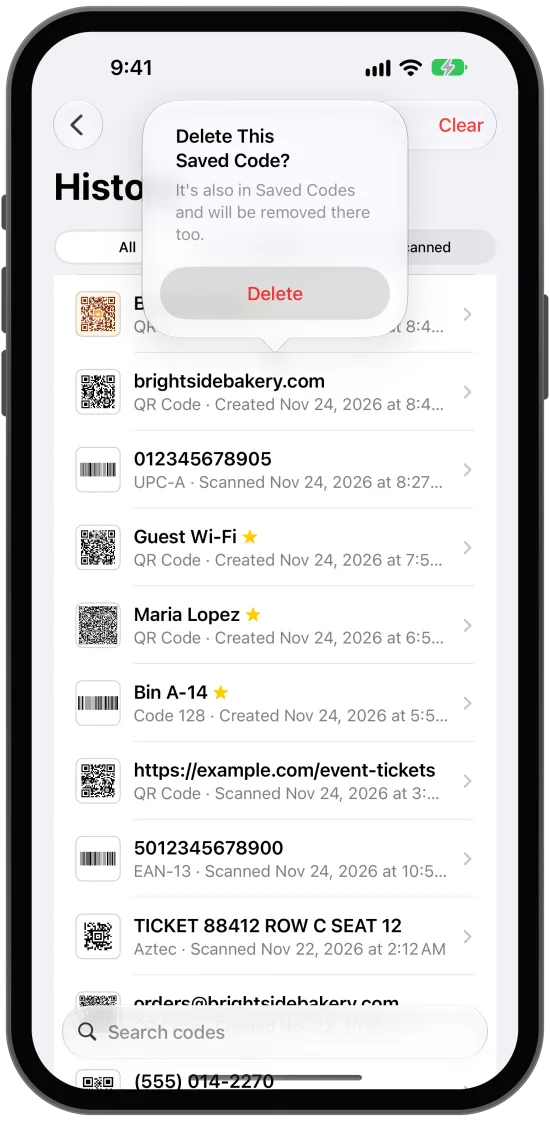
If the code is also saved
You’ll be asked first: “Delete This Saved Code?” with “It’s also in Saved
Codes and will be removed there too.” Tap Delete to remove it from
both.
What you’ll see
The code is gone from History (and Saved Codes) on this iPhone and, with
iCloud on, on your other iPhones too. This can’t be undone. Codes you
already printed or shared keep working: the picture holds the data.
Related articles
Still stuck? Email contact@setriksoftware.com with your app version (Settings › About) and what you saw. If something went wrong in the app, sending the error log helps too. You can also browse the Help Center or the messages the app can show.