

Get to know Setrik QR
Find your way around the start screen and know where everything is.
Setrik QR makes QR codes (for your website, business card and Wi-Fi) and
scans any barcode. Everything starts from one screen.
What’s on the start screen
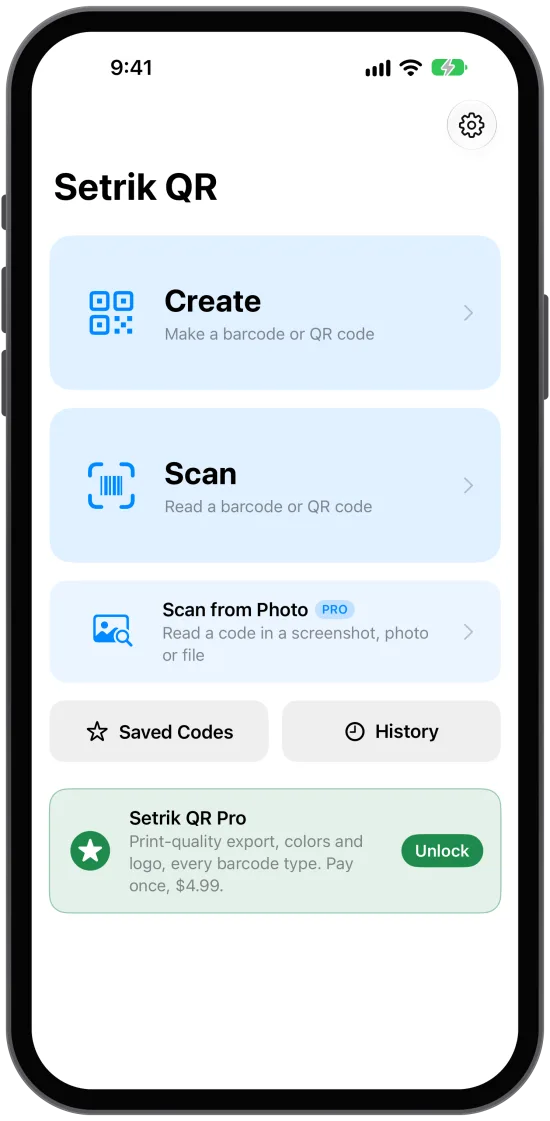
- Create: make a QR code or another barcode.
- Scan: read a code with the camera.
- Scan from Photo: read a code in a screenshot, photo or image file.
It has a PRO badge until you unlock Setrik QR Pro. - Saved Codes: the codes you keep on purpose, each with a name.
- History: every code you’ve made or scanned.
- The gear at the top right opens Settings.
- If you haven’t unlocked Pro, a green Setrik QR Pro card with an
Unlock button sits at the bottom. It goes away once Pro is unlocked.
On every code you open
The code’s screen has your buttons (share, copy, save, show full
screen, and from version 1.1 Edit or Edit a Copy), then a Caption and Frame card, then the
For Print and Design card (Pro).
Tips
- There’s no account to make and nothing to set up. Your codes sync
through your own iCloud by themselves. - At very large text sizes, Saved Codes and History stack on top of each
other instead of sitting side by side.
Related articles
Still stuck? Email contact@setriksoftware.com with your app version (Settings › About) and what you saw. If something went wrong in the app, sending the error log helps too. You can also browse the Help Center or the messages the app can show.