

Plans and purchasesSetrik QR Pro
Restore your Pro purchase
Unlock Pro again on a new iPhone or after reinstalling, without paying twice.
Pro is tied to your Apple ID, so you only buy it once.
Steps
- Make sure you’re signed in to the App Store with the Apple ID you
bought Pro with. - On the start screen, tap the gear (Settings).
- Under Setrik QR Pro, tap Restore Purchases. It reads
Restoring… while it works. (It’s also on the Pro screen, which
closes by itself when Pro is restored.)
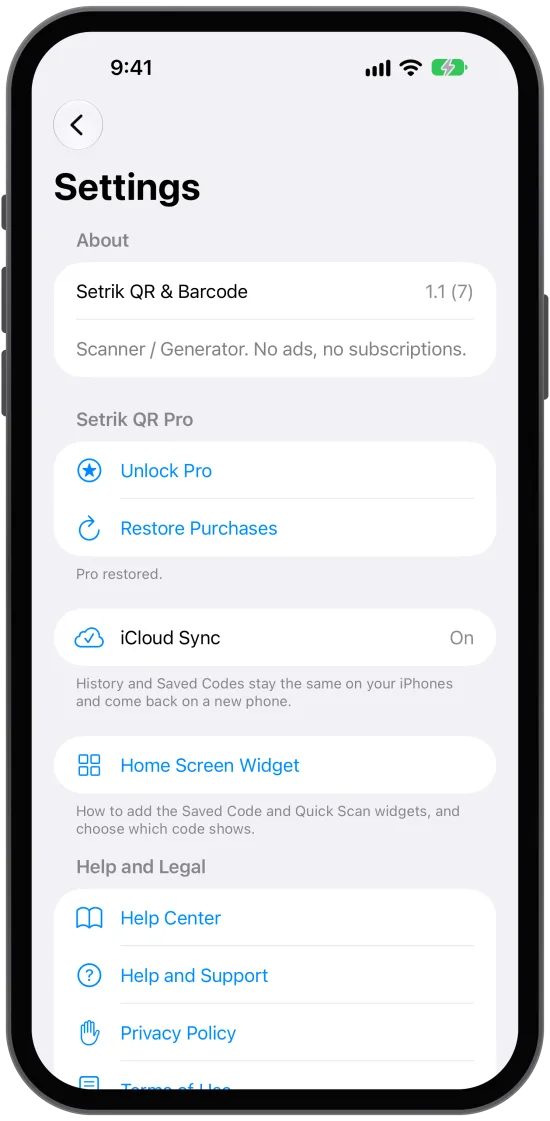
What you’ll see
- “Pro restored.”: you’re all set.
- “No Pro purchase found for this Apple ID.”: this Apple ID hasn’t
bought Pro. Check you’re signed in with the right one. - “Couldn’t restore. Check your internet connection and try again.”
Related articles
Still stuck? Email contact@setriksoftware.com with your app version (Settings › About) and what you saw. If something went wrong in the app, sending the error log helps too. You can also browse the Help Center or the messages the app can show.